Back
Gains App Review
Gains App
A newer gift card cashback app that's essentially a merge of Snoop and JamDoughnut mechanics. Hyped launch hasn't delivered much that wasn't already available elsewhere.
Gains App Review
A newer gift card cashback app that's essentially a merge of Snoop and JamDoughnut mechanics. Hyped launch hasn't delivered much that wasn't already available elsewhere.
T&Cs apply.
Last updated 1 September 2026
On This Page

What is Gains App?
Gains app is a cashback app that launched in 2026. Its tagline is “we make your life less expensive” and the app positions itself as budgeting and cashback in one place. Beyond the gift card cashback, you get a spending tracker and a set of personal finance calculators, and some AI analysis of your spending from your linked accounts.
The tools help you understand personal finance, but they don’t directly put cash back in your pocket. The Gains App feature that actually saves you money is the gift card cashback part. This savings part works the same way as EverUp and JamDoughnut. You buy a digital gift card through the app for one of their partner retailers, the cashback is added to your balance instantly, and you scan the gift card barcode at the till (or paste the code online) to pay. So when you’re comparing Gains to other gift card cashback apps, what you’re really comparing is the cashback rates and retailer list against EverUp and JamDoughnut, and the finance analysis to the likes of Snoop and Emma.
Important things to know
Read these before you sign up so cashback actually saves you money instead of costing you money.
Should you use Gains App?
Probably not as your main cashback app , EverUp and JamDoughnut pay more on the supermarket gift cards most people use. But if you want another app with bundled analysis of your spending (like Snoop) then Gains could be useful to you. The Pro tier isn’t something I’d pay for. Keep reading for my 30 second summary and a fuller description of my experience with Gains.
Is Gains better than EverUp or JamDoughnut?
One of the founders of Gains has reviewed his own app favourably on their blog, but I’m still using it independently alongside EverUp and JamDoughnut to give my opinion on how it compares. I’ll update this review once I’ve used it for longer.
But after testing it for a bit: there isn’t much to keep me using it. The cashback side of the app works very well. You link your current account and use that to buy giftcards. This is the same as JamDoughnut and EverUp, but these also have the option to pay using a credit/debit card via Google & Apple Pay. The cashback percentages I’ve seen tend to be lower than on EverUp for the same retailers, though there are some exceptions. (This is a margins game though, if Gains get more people using them, they might get a better discount from their main supplier.)
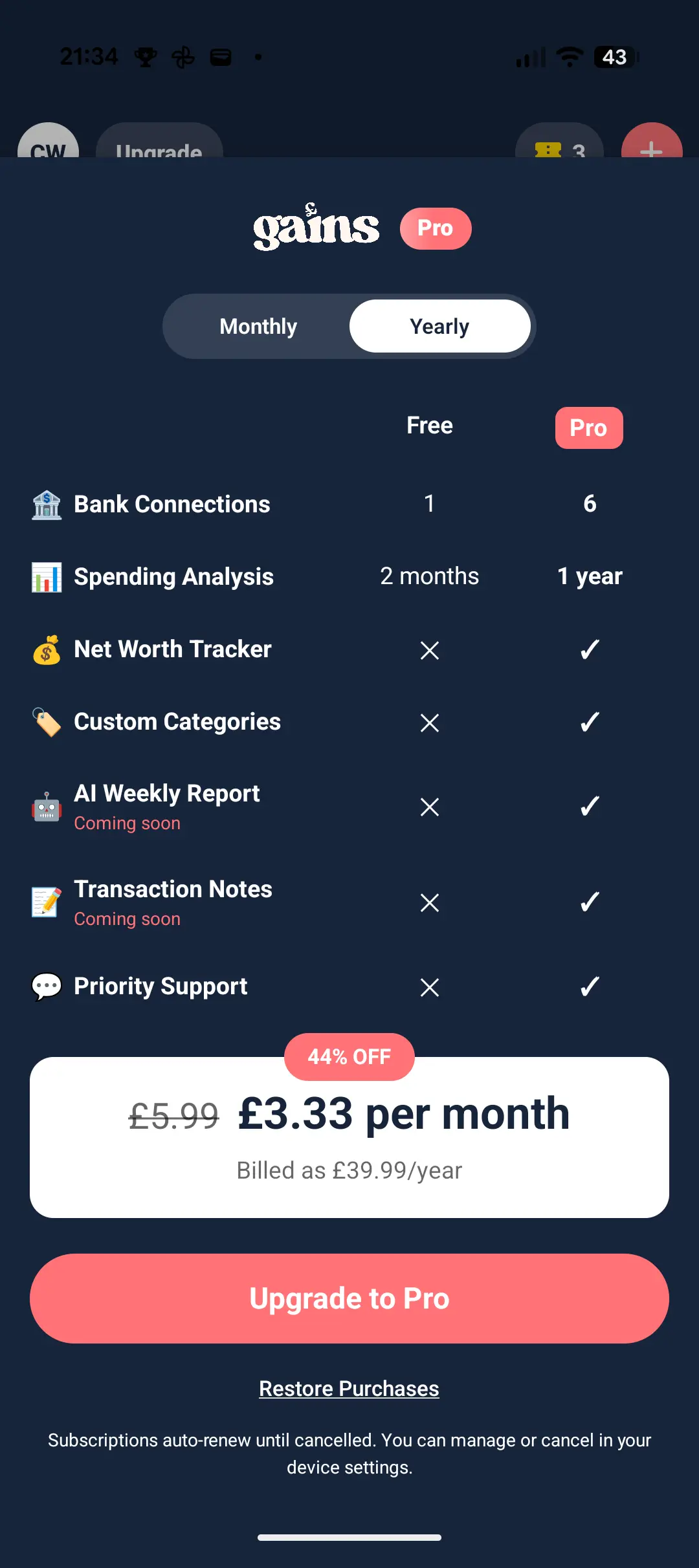
The personal finance calculators bundled in work fine, but I have not had much chance to test out the financial insights on offer. I never connect my main account to these apps. But it promises to work similar to other free apps like Snoop or Emma if that’s what you’re after. There are also tools that are gated behind Pro (net worth tracker, longer spending history, AI weekly report), but these aren’t ones I’d personally pay £39.99/year to unlock, and there (unusually) doesn’t seem to be a free trial to try them out at the moment.
If you’re already using EverUp and JamDoughnut, and have Snoop, Gains doesn’t seem to add much at the moment. But it will be interesting to see what happens as they grow.
How Gains app works in practice
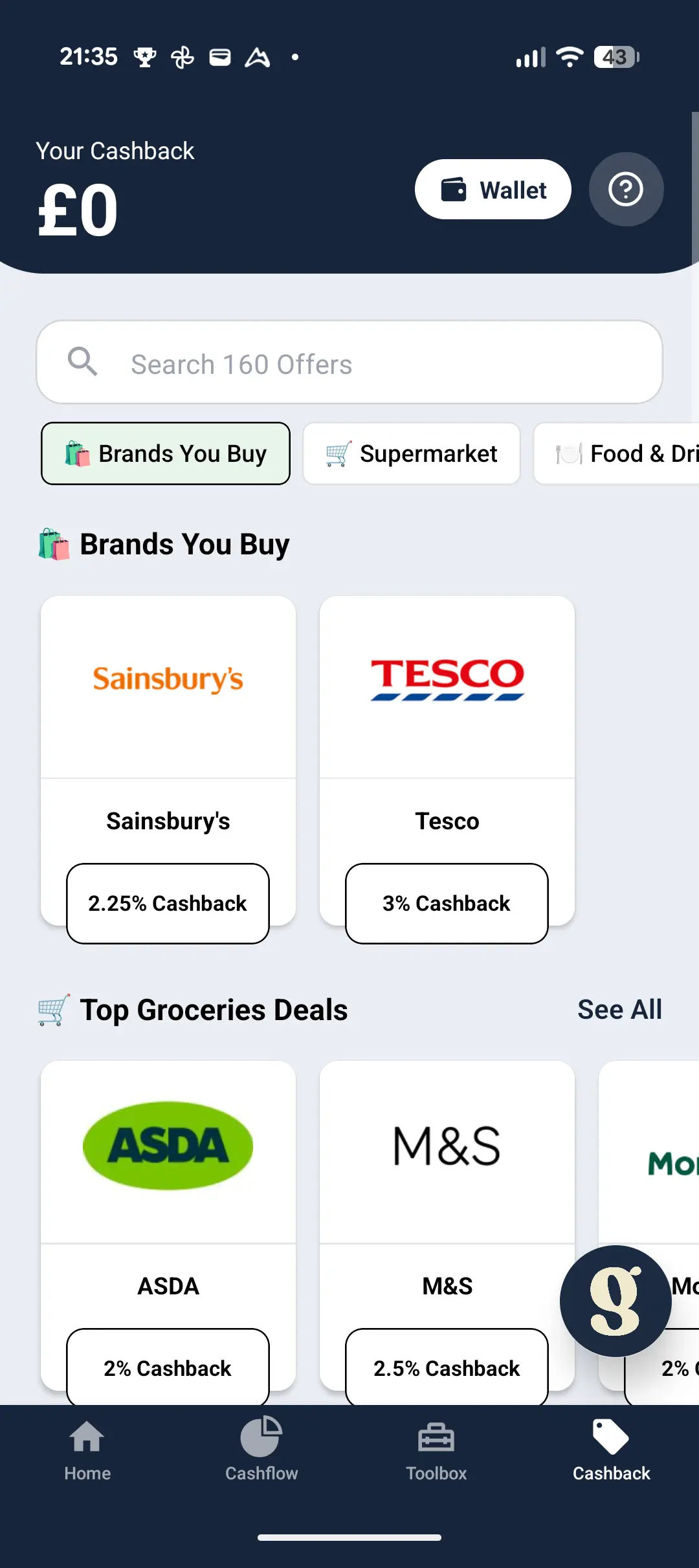
Gains works the same way as EverUp and JamDoughnut at the till. You open the app, pick the retailer, buy a digital gift card for the amount you’re about to spend, then scan the barcode from your phone at the checkout. Cashback is added to your Gains balance the moment you buy the gift card.
Worth knowing: Gains requires you to connect your bank account through Open Banking. It won’t work without that step. It’s the same read-only authorisation you’d give any other Open Banking app like Snoop, Emma or Plum, and it runs through an FCA-regulated partner so your bank login credentials never touch Gains directly. Once connected, Gains analyses your transactions and shows you which of its 200+ partner retailers you’ve spent at recently.
Gains only does gift card cashback. The catalogue is around 200 retailers. Smaller than EverUp’s 300+ or JamDoughnut’s 229. For online retailer cashback outside the gift card model, you’ll still want TopCashback or Quidco. For in-store everyday spend that doesn’t involve a gift card, Airtime or a cashback debit card is the right tool.
What it does well
Instant cashback at the till. This part of the app works just as it is described. It’s now one of the most popular methods of earning cashback after being popularised by EverUp and JamDoughnut (and then being adopted by both Quidco and TopCashback too). Cashback is added to your balance the moment you buy the gift card, before you’ve even spent it. There is no tracking to worry about!
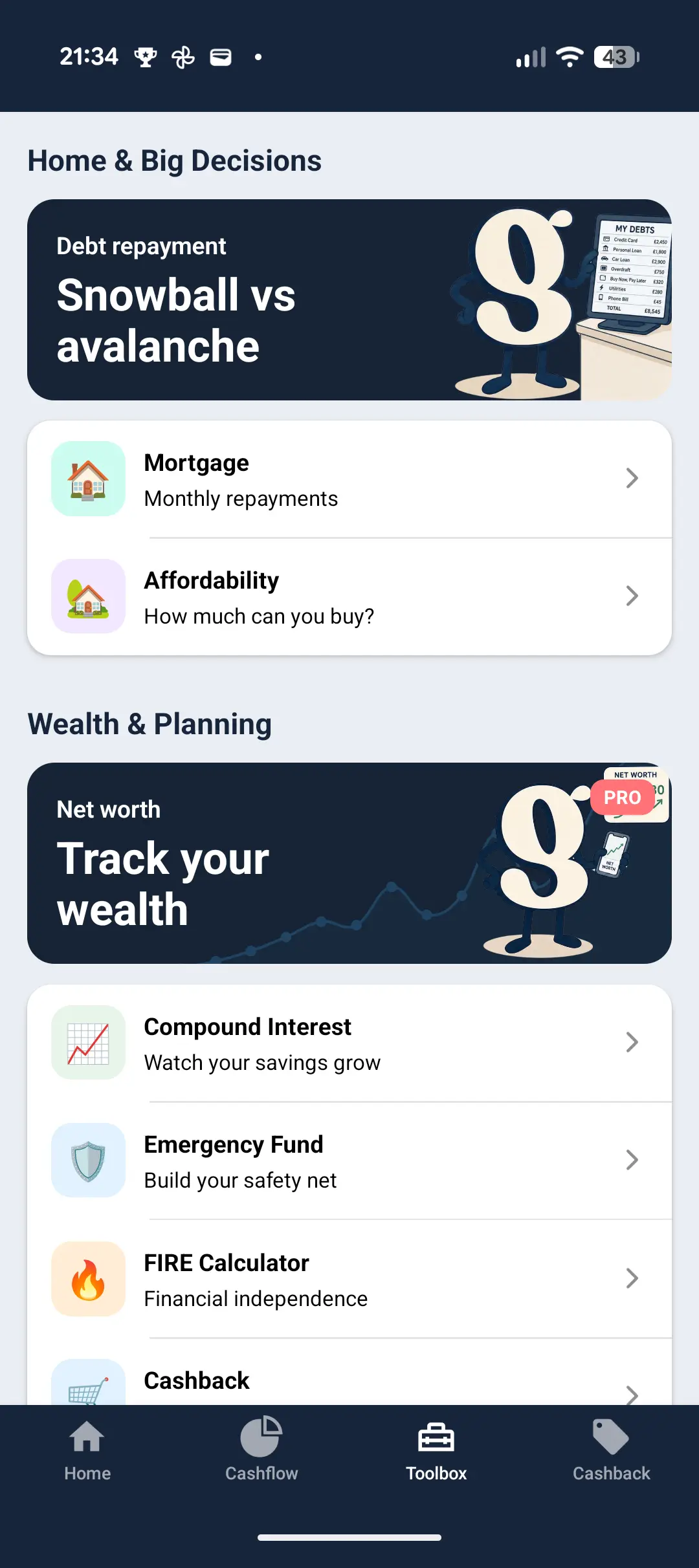
Bundled personal finance calculators. The Gains Toolbox has a snowball-vs-avalanche debt repayment planner, a mortgage repayment calculator, an affordability calculator, compound interest, an emergency fund builder and other personal finance tools. They’re handy if you haven’t run those numbers before, and a nice touch alongside the cashback. Overall, a useful starting point if you’re new to the maths behind personal finance.
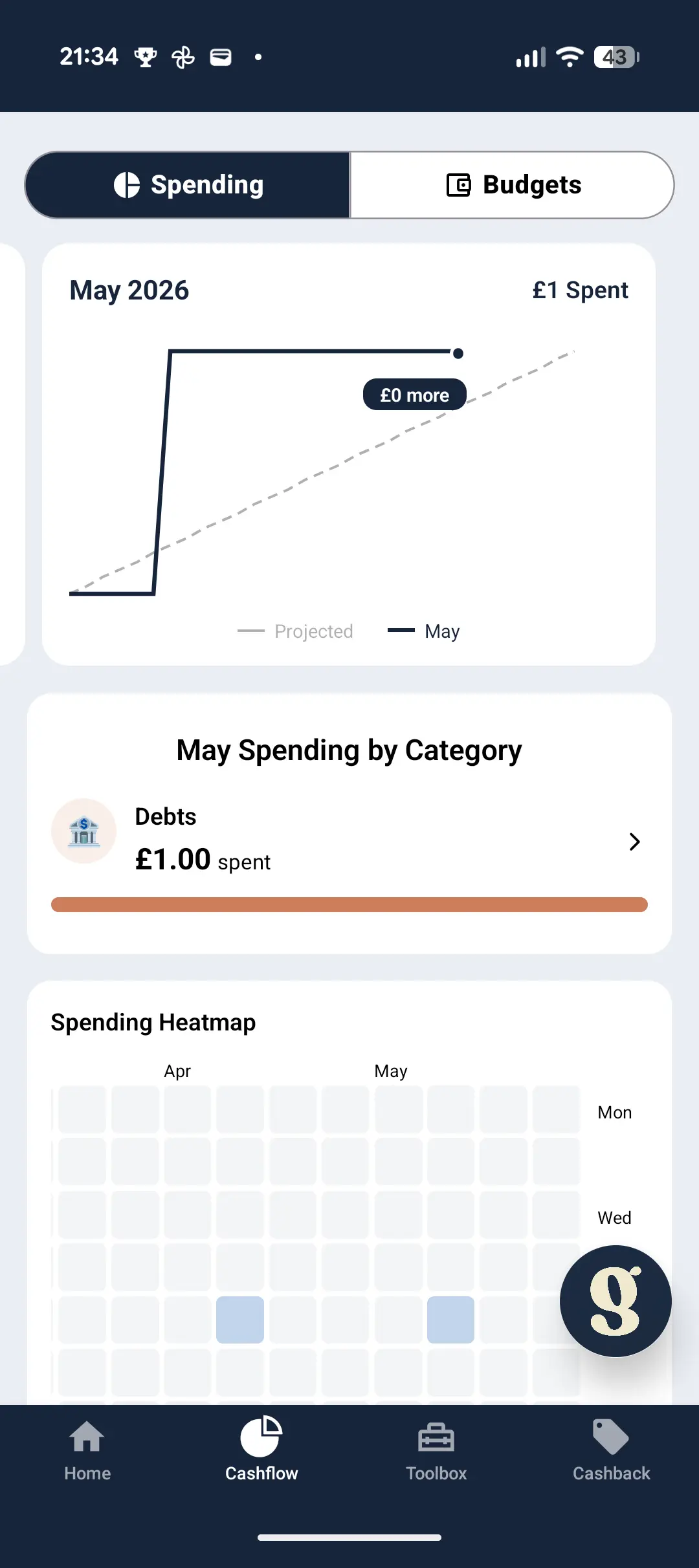
Spending tracker with a heatmap. Depending on your bank, you’ve maybe seen this before. But if not, the Cashflow tab pulls transactions from your connected bank account (via Open Banking) and shows you a running monthly total against a projection, plus a weekly heatmap and a category breakdown. It is useful for an at-a-glance check on the month so far. This is limited to one account and 2 months of history on the Free tier.
FCA-regulated Open Banking partner. Gains App itself is regulated by the FCA (presumably they are going to introduce new features that require this). But their bank connection runs through a regulated provider rather than Gains directly. Your bank login credentials never touch Gains’s systems.
Where it could be better
Cashback rates are a bit lower than other apps in general. On the supermarket gift cards I’ve checked, EverUp usually always pays more. Gains’s rates are reasonable, but most people will find EverUp is the better default.
Smaller retailer list. Gains has around 200 retailers vs EverUp’s 300+ and JamDoughnut‘s 229. The major supermarkets and high-street brands are all there though.
Pro tier isn’t an obvious upgrade. Pro (£3.33/month billed yearly at £39.99) unlocks more bank connections, more spending history (2 months on the free tier), the net worth tracker, custom categories and an AI weekly report. None of those sound good enough to get me to pay to try out the Pro tier. I would say stick to the free tier unless Gains starts to offer a free trial!
Is Gains App safe?
Yes. Gains is a UK company and the bank connection uses Open Banking via an FCA-regulated partner, which means the read-only access to your bank data goes through a properly regulated UK financial services provider. Your bank login credentials never touch Gains’s systems.
The gift card cashback model itself is structurally safe: the cashback is applied at the point of gift card purchase, before you’ve spent it. There’s no tracking to fail and no pending period.
Worth knowing: your cashback balance and unused gift cards aren’t FSCS-protected. If Gains went under, those funds aren’t ringfenced like a bank deposit. As a newer business than JamDoughnut or EverUp, that’s a slightly higher risk to weigh. Not a red flag, but worth keeping your balance low and withdrawing or spending gift cards regularly rather than letting a pot build up.
How much can you earn with Gains?
I haven’t bought any gift cards through Gains yet. I’m keeping an eye on the rates so I can test the withdrawal flow once a decent rate appears. Based on what I’ve seen on the app so far:
Gains pays 2-4% cashback on supermarket gift cards and a similar range on most major high-street brands, with higher rates appearing on selected retailers during promotional periods. The maths is similar to EverUp and JamDoughnut: a household putting £100 a week of supermarket shopping through Gains at the typical rates would earn somewhere between £100 and £200 a year. At £200 a week, between £200 and £400.
Gains’s own marketing claims a household spending £2,500 a month across typical categories could earn £500-£1,200 annually. That’s a reasonable range based on the rates I’ve seen in the app, especially if you route higher-cashback categories like dining and entertainment through Gains alongside your weekly supermarket shop.
It’s not life-changing money. But it’s money that’s best back in your pocket. I’ll update this section with real numbers once I’ve actually run a purchase through the app and tested the cashout.
How to sign up for Gains App
- Go to the Gains app website.
- Download the app on iOS or Android and create your account.
- Connect your main bank account through Open Banking. This is required to use Gains, and runs through an FCA-regulated partner with read-only access. It’s the same authorisation you’d give Snoop, Emma or Plum.
- Buy your first gift card through the app. The cashback is added to your balance instantly.
- Use the gift card at the till by scanning the barcode, or paste the gift card code on the retailer’s website for online purchases.
Gains is free to use for the cashback, the calculator tools, basic spending tracking and one bank connection. Pro (£3.33/month billed annually at £39.99) adds the rest. Worth using the Free tier first to work out whether you’d ever genuinely use the Pro-tier features before paying.
Payouts
Withdraw to bank transfer once your balance hits £10. Standard bank transfer arrives in a few working days. Or spend your balance on more gift cards from within the app. Same financial outcome whether you withdraw cash or run the balance directly. Worth checking the wider gift card cashback market before assuming Gains’s rates are the best available for the specific retailer you want.
Gains App Quick Facts
| Rating | ★★★★★ 3.0/5.0 |
| Year Launched | 2026 |
| Region | UK |
| Min Age | 18+ |
| Signup Bonus | – |
| Min Cashout | £10 |
| Payout Speed | Instant to Gains balance; bank transfer once balance hits £10 |
| KYC Required | – |
| Referral Program | – |
| Mobile App | Yes |
| Retailer Count | 200+ |
| Browser Extension | No |
| Card Linking | No |
| In-Store Cashback | Yes |
| Covers Utilities | – |
Should you use Gains App?
For most gift card cashback purchases, EverUp and JamDoughnut will pay the highest rates. They cover more retailers than Gains and pay more on the supermarket categories most readers spend on. If you only sign up to one or two gift card cashback apps, sign up to those.
Gains is worth installing if you think you would value the bundled budgeting tools. Plus, as the app gets more users, it’s likely that their cashback rates will increase (as they gain more purchasing power). But I wouldn’t pay for the Pro tier. The Free tier covers the cashback and the calculator tools.
Frequently Asked Questions
What’s the difference between Gains app and EverUp or JamDoughnut?
All three are gift card cashback apps with the same basic mechanic: buy a digital gift card through the app, scan the barcode at the till, and the cashback is added to your balance instantly. The differences are in rates, retailer catalogue, and what else is bundled with the cashback. EverUp usually pays a bit more on supermarket gift cards and covers 300+ retailers. JamDoughnut sits a touch below EverUp on rates but has 229 retailers plus the Local tab for nearby cashback and a petrol price view. Gains covers around 200 retailers and pays slightly less than both on the categories most readers spend on. What Gains adds is a set of bundled personal finance calculators and a spending tracker, but those are basic compared to dedicated finance apps like Snoop or Emma.
Do I have to connect my bank account to use Gains?
Yes, the bank connection is required. Gains uses it to surface cashback offers based on where you actually shop and to power the spending tracker. The connection is read-only and runs through an FCA-regulated Open Banking partner, so your bank login credentials never touch Gains directly. It’s the same authorisation you’d give Snoop, Emma or Plum.
Is Gains safe?
Yes. Gains is a UK company and the bank connection uses Open Banking through an FCA-regulated partner, so the read-only access to your transactions goes through a properly regulated UK financial services provider. The gift card cashback model is structurally safe because the cashback is applied when you buy the gift card, before you’ve spent it. There’s no tracking to fail and no pending period. The one caveat: your cashback balance and unused gift cards aren’t FSCS-protected. As a newer business than JamDoughnut or EverUp, that’s a slightly higher risk to weigh, not a red flag, but worth keeping your balance low and withdrawing or spending gift cards regularly rather than letting a pot build up.
Is the Gains Pro tier worth paying for?
No, not for me. The Free tier covers the cashback, the calculator tools and basic spending tracking. Pro (£3.33/month billed annually at £39.99) adds more bank connections, a year of spending history, the net worth tracker, custom categories and an AI weekly report. None of those are essential, and the AI weekly report isn’t a feature I’d personally use. Stick with the Free tier unless you’ve used the app for a while and know which Pro feature you want.
Can I stack Gains with a cashback credit card?
Yes, cleanly. The card cashback is paid on the transaction value regardless of where you bought the gift card, so the two stack without interference. See my cashback stacking guide for combining gift card cashback with credit cards, cashback debit cards, and click-through cashback sites.
Is cashback taxable in the UK?
Cashback earned on personal shopping is not taxable in the UK. HMRC treats consumer cashback as a discount or rebate rather than income, so it falls outside the tax system and doesn’t need to be declared. This applies to gift card cashback apps like Gains, EverUp and JamDoughnut as well as click-through cashback sites like TopCashback and Quidco.
What is a cashback site and how does it work?
A cashback site is a middleman between you and the retailer. When you click through to a shop using a cashback site link, the retailer pays the cashback site a commission for sending you their way. The cashback site then passes most of that commission back to you as cashback in your account. You don’t pay anything extra, you don’t share your card details with the cashback site, and you generally pay the same price you would have paid by going to the retailer directly.
The whole system is funded by retailers, who treat the commission as a marketing cost. Cashback sites compete on how much of that commission they pass back to members, the breadth of retailers they cover, and how easy they make the payout process.
Are cashback sites safe and legitimate?
The established UK cashback sites (TopCashback, Quidco, Rakuten, KidStart and a handful of smaller ones) are legitimate and have been operating for over a decade in most cases. They are registered companies, regulated by the same consumer protection laws as any UK e-commerce business, and have paid out hundreds of millions of pounds between them. You don’t share payment card details with the cashback site itself, you don’t pay a membership fee, and there is no upfront cost.
Smaller or newer cashback sites can be riskier. If a site looks new, doesn’t list a registered company name, or asks for unusual personal information up front, treat it with caution. The reviews on Scrimpr only cover cashback sites that have a track record of paying out reliably.
How long does it take to get my cashback?
There are usually two stages. Pending cashback appears in your account within a few days of your purchase, sometimes within minutes. It is the cashback site’s record that your click-through resulted in a sale. Confirmed cashback lands once the retailer has reviewed the transaction and accepted that it was valid (you didn’t return the item, the order wasn’t cancelled, the payment didn’t bounce). Confirmation typically takes between 30 and 90 days, and some retailers can take six months or more.
Once your cashback is confirmed, withdrawing it to your bank account or PayPal usually arrives within a working day. The slow part of the process is almost always the retailer side, not the cashback site side.
Why has my cashback not tracked?
Tracking failures are the single most common complaint with any cashback site, and the cause is almost always one of the following:
- Cookies were blocked or cleared between clicking through and checking out. The cashback site uses a cookie to remember which member sent you to the retailer, and if the cookie is missing the sale won’t be attributed to you.
- An ad-blocker, privacy extension or VPN silently dropped the tracking request. This is the cause in a large share of cases where the member is certain they did everything right.
- You browsed the retailer’s site separately before clicking through. Most retailers attribute the sale to the most recent affiliate cookie, so an earlier direct visit can overwrite the cashback site’s tracking.
- You used a discount code that wasn’t sourced from the cashback site. Many merchants void the cashback entirely if you apply an external code at checkout. Always check whether the cashback site lists the code before using it.
- The retailer treats your purchase category as ineligible. Some retailers exclude certain product categories from cashback (gift cards, subscriptions, in-store collections etc.). The merchant page on the cashback site usually lists the exclusions.
If your cashback hasn’t tracked after the expected window, raise a “missing cashback” ticket through the cashback site with your order number, the date and time of purchase, and the merchant’s confirmation email attached.
What does "confirmed" cashback mean?
Confirmed cashback is cashback that the retailer has reviewed and accepted as a valid sale. Only confirmed cashback can be withdrawn. Until your cashback is confirmed, it sits in a pending state and could in theory still be voided (typically if you return the item, cancel the order, or the payment fails after the fact). In practice, most pending cashback does eventually confirm, but it can take longer than you might expect.
Can I use cashback sites alongside discount codes?
It depends on the retailer and where the code came from. Voucher codes that are listed directly on the cashback site itself are normally safe to use, because the cashback site already knows about them and won’t void your transaction. Codes sourced from other voucher sites or social media often invalidate your cashback entirely.
The safest approach is to check the cashback site’s merchant page before completing your purchase. If a code is listed there, it should stack. If it isn’t, you may need to choose between using the code or earning the cashback, and for higher-value purchases the cashback is often the better deal.
Can I use multiple cashback sites at the same time?
Yes. The vast majority of people who take cashback seriously have accounts on TopCashback, Quidco and Rakuten as a minimum, and check the rates at each before clicking through. Rates and exclusive deals vary between sites, so the same purchase can pay quite different amounts depending on where you start.
You can only use one cashback site per transaction, however. The site you clicked through from last is the one that gets attributed to the sale, so don’t bounce between cashback sites during checkout.
Is cashback taxable in the UK?
Cashback earned on personal shopping is not taxable in the UK. HMRC treats consumer cashback as a discount or rebate rather than income, so it falls outside the tax system and doesn’t need to be declared. This applies whether the cashback is paid through a dedicated cashback site, a credit card scheme, or as part of a current account reward programme.
The picture changes if you are using cashback as part of a business or trading activity (for example, if you operate a buy-and-resell business and the cashback effectively reduces your cost of goods). In that case the cashback would normally be netted off against the cost of the purchase rather than counted as income, but the right answer depends on your specific setup. If in doubt, check with HMRC or an accountant.
What’s the difference between a cashback site and credit card cashback?
A cashback site pays you a percentage of the retailer’s commission whenever you click through their link. A cashback credit card pays you a percentage of every purchase you make on the card, regardless of where you shop or how you got there.
The two stack cleanly. You can click through a cashback site to a retailer, pay with a cashback credit card, and earn cashback from both sources on the same transaction. For larger purchases, stacking cashback site rewards with a 1-2% cashback credit card can meaningfully reduce the net cost.
Why does the cashback I earn sometimes get voided?
The most common reasons for a confirmed cashback being voided after the fact are: the order was cancelled or refunded, you returned the item, the payment was charged back, you used a discount code that wasn’t listed on the cashback site, you registered a duplicate account at the retailer, or the retailer disputed the transaction with the cashback site.
If the cashback was voided in error, you can raise a dispute with the cashback site and supply your order confirmation, payment receipt, and any other proof that the transaction was valid. Most cashback sites will manually reinstate the cashback if you provide good evidence.
Is using a cashback site free?
Yes. Established UK cashback sites are free to join and free to use. You don’t pay a membership fee, you don’t share payment card details with the cashback site itself, and withdrawals to your bank or PayPal don’t cost anything. The site makes its money from the share of retailer commission it keeps when it passes the rest back to you.
Some sites offer an optional paid tier (Quidco Premium is £5/year, for example) that bumps your rates on selected retailers and gives you priority customer support. The free tier still works fully without ever upgrading.
Are cashback sites only for online shopping?
Mostly, yes, but not entirely. The bulk of cashback comes from clicking through a cashback site to an online retailer before checkout. However, several cashback sites also offer:
- In-store cashback through prepaid gift cards — you buy a gift card on the cashback site at a discount or with cashback attached, then use it at the till.
- Card-linked cashback — link a debit or credit card to the app, spend at participating retailers in-store, cashback is tracked automatically.
- Utility, insurance and broadband switches — handled through embedded comparison tools on the cashback site itself, with cashback paid for completed switches.
For everyday in-store spend, dedicated cashback debit cards and Airtime usually pay more than the in-store features of general cashback sites.
Is cashback worth doing for small purchases?
Honestly, no — most cashback under about £1 is a poor use of your time, especially if it requires clicking through a comparison tool and remembering to start your shopping journey from the cashback site. The bigger the purchase, the more cashback matters. A 5% rate on a £400 mobile contract switch pays £20 for thirty seconds of effort. A 5% rate on a £4 add-on order pays 20p.
The realistic value of any cashback site is in the larger discretionary purchases (insurance, broadband, mobile contracts, holidays, white goods) where 30 seconds of comparing rates can return £50-£100+ of cashback. The small everyday tracked purchases are a bonus on top, not the main event.
How do cashback sites make money, and what does "100% cashback" actually mean?
The major UK cashback sites (TopCashback and Quidco) operate on a “100% cashback” model. That phrase is widely repeated and often misunderstood. It does not mean you get 100% of what you spend back. It means the cashback site passes on 100% of the affiliate commission the retailer pays them, without skimming a margin from your share. So if a retailer pays a 5% commission, you receive the full 5% as cashback rather than 4% with the cashback site keeping 1%.
These sites earn their actual revenue from two separate sources:
- Retailer bonuses (overrides) — extra payments that retailers make to top-performing affiliates for hitting agreed volume targets. These are paid by the retailer on top of the per-transaction commission and aren’t allocated to any individual customer.
- Optional paid tiers — TopCashback Plus and Quidco Premium (£5/year) are opt-in upgrades for boosted benefits.
Despite claims published elsewhere, neither TopCashback nor Quidco silently retains £5-£12 a year, or any percentage of your cashback, on the standard Classic tier. Both companies’ published terms confirm that Classic membership has no automatic deductions, and Quidco’s own help docs explicitly state the same.
See our reviews of other cashback sites and apps