

Complete Savings is a cashback website that gives you money back when you shop with participating retailers. It works with more than 1,000 shops, including eBay and Argos, and offers at least 10% cashback at most of them.

- Online cashback
- 10%+ at most shops
- Monthly fee
- Usually £18
- Monthly Bonus
- £18, claimed back
- Cashback limit
- £250 a month
To earn cashback, you visit a retailer through Complete Savings, make your purchase at the normal price and receive a percentage of your spending back once the transaction has been approved. For example, spending £100 before VAT at a retailer offering 10% cashback would earn you £10.
Unlike free cashback websites such as TopCashback, Complete Savings charges a monthly membership fee, usually £18. However, it also offers a Monthly Bonus that can cover the cost of membership. By making a qualifying purchase and claiming the bonus every month, you can effectively recover your subscription fee.
The complication is that not everyone has the same membership conditions. Some people must buy something from the retailer they originally joined through each month, while others can claim using purchases from a wider selection of shops, including eligible supermarket receipts.
This makes choosing the right joining offer particularly important. In this guide, I’ll explain how to find Complete Savings through National Rail, how to claim your monthly fee back and how to earn cashback both online and in-store.
For my experience using the service, including my earnings and whether I think it’s worth joining, see my Complete Savings review.
How to join Complete Savings
You can’t simply visit the Complete Savings website and register in the same way you would with TopCashback or Quidco. Instead, Complete Savings promotes its membership through partner retailers, often by displaying an offer after you’ve made a purchase.
You might, for example, see an invitation to join after shopping on eBay or using a travel-booking website. These offers typically advertise an introductory cashback reward, alongside the benefits you’ll receive as a member.
The important thing to understand is that the retailer you join through can affect your membership conditions, particularly how you qualify for the Monthly Bonus.
Why your joining offer matters
The Monthly Bonus is a reward you can claim each calendar month after making a qualifying purchase. It’s particularly valuable because the amount will often match your membership fee.
However, Complete Savings has offered different conditions depending on how members join.
With some memberships, you must make a purchase from the retailer you originally joined through. For example, if you joined through eBay, you might need to buy something from eBay every month to recover your subscription fee.
That’s fine if you regularly use eBay, but it’s less convenient when you have nothing you actually need. Buying something purely to qualify for a bonus introduces an extra cost.
Other memberships are more flexible. Instead of returning to one particular retailer, you can use qualifying purchases from a wider selection of shops. Some also allow ordinary in-store receipts, meaning you could potentially recover your membership fee using shopping you were already going to do.
This is the main thing I’d check before joining. Being able to claim your bonus through normal spending makes Complete Savings much easier to manage.
The conditions that apply to you are confirmed in your Membership Pack, which is sent after registration. It sets out your fee, rewards and any special membership requirements. The benefits shown in your account’s Earnings page are also worth checking.
How to join Complete Savings through National Rail
One way to find a Complete Savings joining offer is through the National Rail website.
National Rail is an official Complete Savings partner. I’ve used this method to sign up myself, and when I checked it again in November 2026, I was able to reach a Complete Savings registration offer without buying a train ticket. Here’s the process I followed.
- Search for a train journey
Visit National Rail and enter a departure station, destination and travel date. Select Search to bring up the available journeys. You don’t need to be planning a train trip. The purpose is simply to reach the ticket-selection page, where the Complete Savings offer may appear.
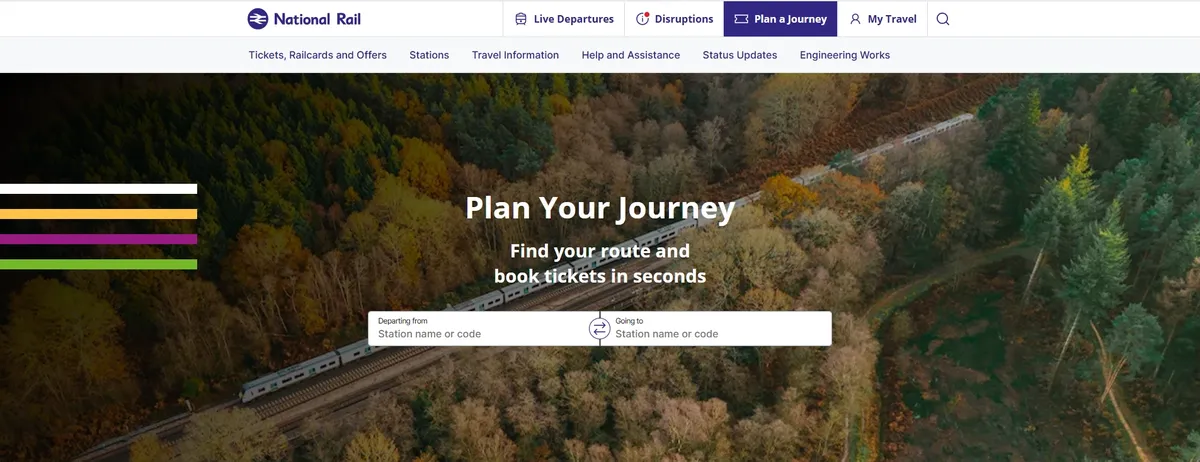
Start by searching for a journey on the National Rail website. - Choose a ticket
Once the results appear, select a suitable journey and click Buy tickets. National Rail should open the relevant train company’s booking website in another browser tab. You don’t need to complete the ticket purchase.
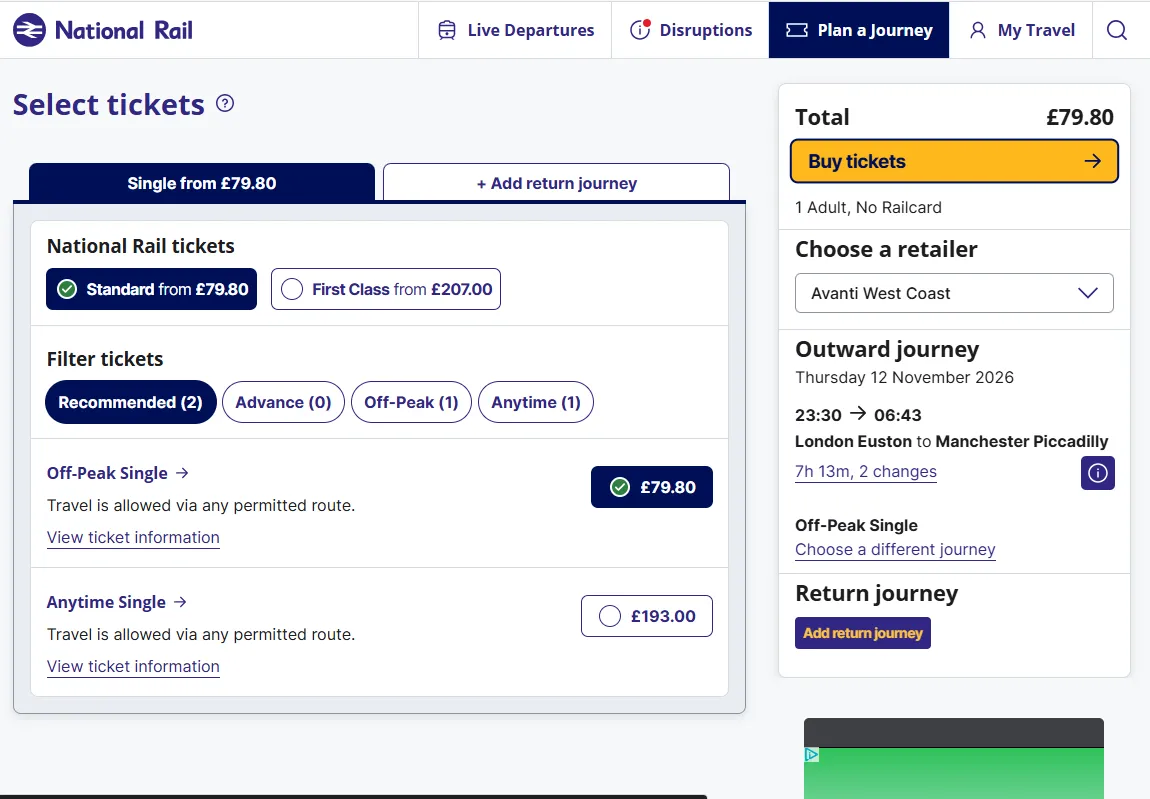
Choose a ticket and click Buy tickets to continue. - Return to the National Rail tab
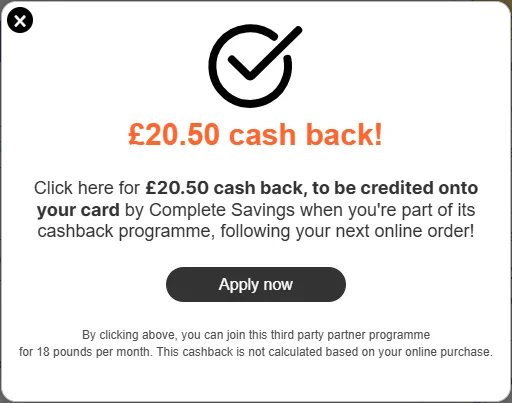
Go back to the original National Rail tab. When I tested this method in November 2026, a Complete Savings pop-up appeared offering £20.50 cashback for joining. If the offer appears, click Apply now to continue to the registration page.

The Complete Savings joining offer that appeared during my November 2026 test. - Check the offer and register
The registration page explains the introductory reward, membership benefits, free trial and monthly subscription fee. You’ll be asked to provide your personal details, email address, password and the payment card you want to use for your membership. Read the terms carefully before registering, particularly those covering your Monthly Bonus.
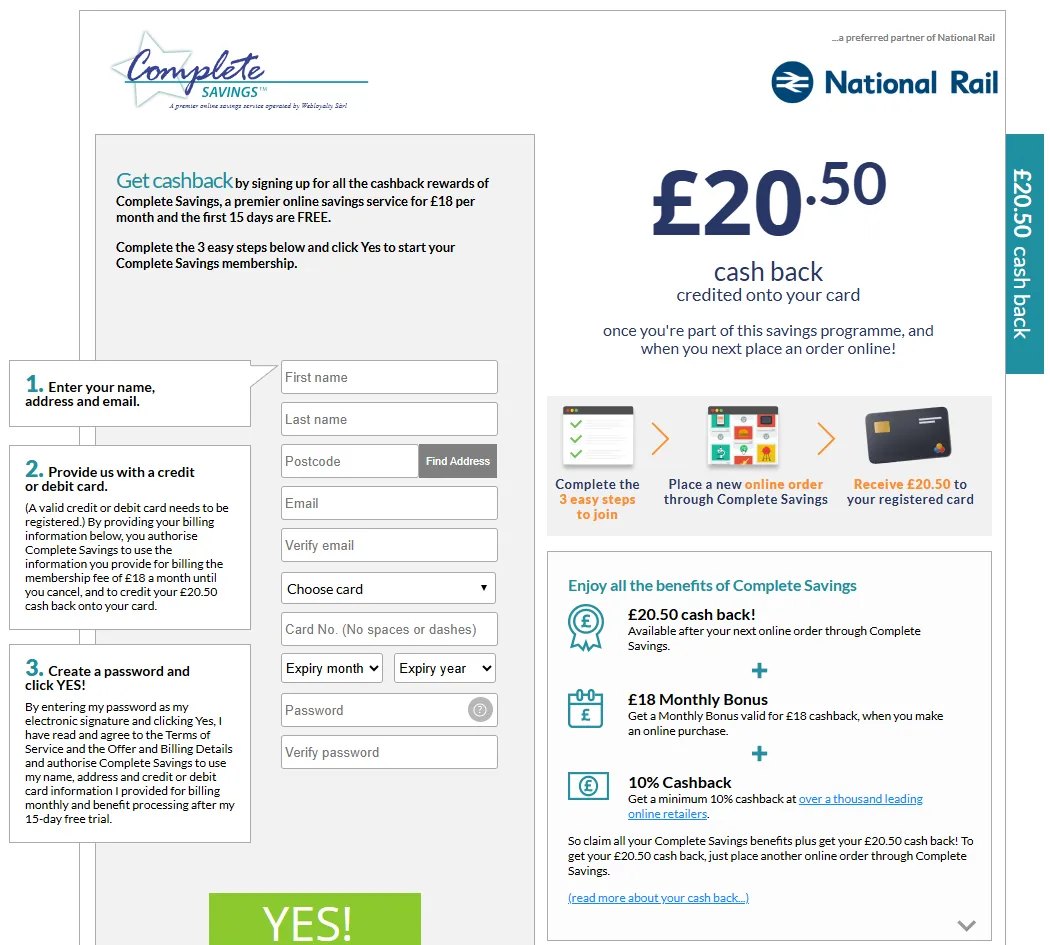
The Complete Savings registration page reached through National Rail.
What does the National Rail offer include?
When I checked in November 2026, the offer advertised the following benefits:
| Benefit | November 2026 offer |
|---|---|
| Welcome Reward | £20.50 after an eligible online purchase |
| Monthly Bonus | £18 per calendar month |
| Online cashback | At least 10% at most participating retailers |
| Free trial | 15 days |
| Membership fee | £18 a month after the trial |
The offer was intended for new members, rather than people who already had an active Complete Savings membership.
One detail worth highlighting
The joining page describes the Monthly Bonus as requiring an online purchase. My own membership, also obtained through National Rail, allows me to claim using eligible in-store receipts. That doesn’t necessarily mean every National Rail membership has identical conditions. Check the offer you’re actually given and your Membership Pack before relying on in-store shopping to qualify.
The National Rail method may also change or stop appearing, so don’t assume it’s guaranteed every time.
Once you’ve registered, I’d recommend saving your Membership Pack and checking the Earnings page straight away. Confirm how your Monthly Bonus works before you start making purchases specifically to qualify for it.
How to claim your £18 Monthly Bonus
The Monthly Bonus is one of the most useful benefits of Complete Savings because it can offset the monthly subscription fee.
For example, if you’re charged £18 a month and receive an £18 Monthly Bonus, successfully claiming it means you’ve recovered the full cost of that month’s membership.
If the qualifying purchase was something you were already going to buy, that’s an excellent arrangement. It means you can retain access to Complete Savings’ cashback rates without an ongoing net membership cost, provided you continue claiming the bonus.
However, the Monthly Bonus isn’t automatic. You must make a qualifying purchase each calendar month and complete the relevant claiming process.
Which purchases qualify?
That depends on the membership you joined.
If your membership is tied to the retailer you registered through, you’ll normally need to make a purchase from that retailer.
With a more flexible membership, purchases from other eligible retailers can also count. Depending on your conditions, this may include in-store shopping receipts.
The standard terms don’t specify a general minimum purchase amount, but the purchase must be genuine, eligible and made while your membership is active.
It’s also important to check whether you need to start the purchase through Complete Savings or whether an ordinary receipt is accepted. Your Membership Pack determines which retailers and purchases qualify.
How to claim your Monthly Bonus
The process is slightly different for online purchases and in-store receipts, but both start with making a qualifying purchase.
- Make an eligible purchase
If you’re shopping online, follow the retailer’s link from Complete Savings before buying. If you’re shopping in-store and your membership permits receipt claims, keep your receipt as proof of purchase.
- Make sure the purchase has been recognised
Online purchases should normally track automatically and appear in your Earnings page. For eligible in-store receipt claims, you can send a clear photograph of your receipt to cashback@completesavings.co.uk, including your membership number and asking for offline cashback. Once the receipt has been accepted and the qualifying purchase appears in your account, you can proceed with the Monthly Bonus.
- Click Claim Now
Log into Complete Savings, open your Earnings page and find the Monthly Bonus. Click Claim Now once the qualifying purchase has been recognised. With the in-store receipt method I’ve used, the button becomes available after the receipt has been approved.
- Check your bonus
Return to the Earnings page and confirm that the Monthly Bonus has been accepted and credited to your account.
You can also send a Monthly Bonus claim directly to monthlybonus@completesavings.co.uk, including your membership number, name and qualifying purchase confirmation. This is the dedicated Monthly Bonus email address in the published terms.
The important difference is that emailing a receipt for offline cashback and claiming the Monthly Bonus are not necessarily the same action. Make sure you’ve completed the bonus claim rather than assuming it will happen automatically.
What information must your receipt include?
Complete Savings needs enough information to verify the purchase.
For in-store purchases, the receipt should show the retailer’s name and address, what you bought, the amount spent, the date and time, and the last four digits of the payment card used.
For online purchases, you’ll normally need the order confirmation number, purchase date and details of any delivery charges.
Receipts can be submitted as PDF, JPG, PNG or GIF files, with a maximum file size of 20MB. Make sure the whole receipt is clear and readable.
When is the Monthly Bonus deadline?
This is something I’d be particularly careful about.
Under Complete Savings’ terms effective 3 June 2026, the qualifying purchase must be made during the calendar month you’re claiming for. The terms also require you to click Claim Now before the end of that month.
If a purchase hasn’t tracked, the terms allow you to upload a qualifying receipt within 30 days of buying.
However, the published FAQ also refers to a 30-day claiming window, which isn’t entirely consistent with the formal terms. I’d follow the stricter rule and complete your claim before the end of the calendar month.
For example, if you make a qualifying purchase on 10 November, aim to have your Monthly Bonus claimed before November ends.
Leave time for in-store receipts
Complete Savings needs time to process them. If you submit a receipt on the final day of the month, the Claim Now button might not become available before the deadline. I’d set a recurring reminder around the 25th of each month and check that your bonus has been processed.
How to claim your Welcome Reward
As well as the Monthly Bonus, new Complete Savings members can receive a one-off Welcome Reward.
This is an introductory cashback payment offered when you join. The amount and conditions depend on the promotion you registered through.
For example, the National Rail offer I found in November 2026 advertised £20.50 cashback. However, you don’t necessarily receive this simply for signing up. You usually need to make a qualifying purchase first.
Some offers allow you to claim the Welcome Reward using the purchase that led you to join. Others require another eligible purchase after registration.
Your Membership Pack and Earnings page explain which rules apply.
How do you claim it?
Once you’ve made the required purchase:
- Log into Complete Savings
Open your Earnings page.
- Find the Welcome Reward
Click Claim Now, if that option is shown.
- Submit your purchase confirmation if required
If the purchase hasn’t tracked automatically, upload your order confirmation through the Earnings page.
- Check the reward status
Once approved, the payment will be processed according to your joining offer.
You can also email your purchase confirmation to welcomereward@completesavings.co.uk. Include your name, membership number and order information. The published terms specify a 500KB attachment limit for this email route.
Complete Savings says valid Welcome Reward claims are paid within 10 working days. Depending on your membership, the reward may be paid to your registered card rather than appearing as ordinary withdrawable cashback.
You cannot use the same purchase for your Welcome Reward and Monthly Bonus. If you want to claim both, you’ll need separate qualifying purchases.
This is worth remembering during a free trial, when you may be eligible to claim both rewards before your first membership fee is due.
How to earn 10% cashback online
Complete Savings works much like other cashback websites, but it offers significantly higher rates at many retailers. Most participating shops offer at least 10% cashback, with occasional promotions offering even more.
To earn cashback, you need to visit the retailer through Complete Savings rather than going directly to its website.
- Find the retailer on Complete Savings
Search for the shop you want to buy from and check the current cashback rate. Read the conditions, as some products, customer types or discount codes may be excluded.
- Click through and make your purchase
Complete Savings will redirect you to the retailer’s website, where you can shop and pay as normal.
- Check your cashback has tracked
Your purchase should appear in the Earnings section, initially as pending cashback. Once the retailer has verified the transaction, it can be approved and made available for withdrawal.
Cashback can occasionally fail to track, particularly if you use an ad blocker, visit another cashback website during checkout or apply a discount code that isn’t eligible.
For more advice, see my guide to how cashback tracking works and how to avoid missing cashback.
Is Complete Savings always the highest-paying cashback website?
No, although it frequently offers some of the best rates.
Cashback percentages change regularly, and free cashback sites sometimes run promotions that beat Complete Savings. Different sites may also have different exclusions, so the highest advertised percentage isn’t always the best deal.
Before buying something, I’d recommend checking the Scrimpr cashback comparison tool to see which website currently pays the most.
You can also browse the full list of Complete Savings retailers.
How much cashback will you actually receive?
One thing that’s easy to misunderstand is that 10% cashback doesn’t necessarily mean you’ll receive 10% of the amount you pay at checkout.
Complete Savings normally calculates cashback on the eligible purchase price before VAT, delivery charges and other excluded costs. For example, imagine buying a product for £120, including 20% VAT.
| Price paid at checkout | £120 |
|---|---|
| Eligible price before VAT | £100 |
| Cashback rate | 10% |
| Cashback earned | £10 |
You’d therefore earn £10 cashback, assuming the whole purchase qualifies.
The same calculation applies to higher cashback percentages. Always check the retailer’s conditions rather than assuming the advertised rate applies to everything in your basket.
Complete Savings also has a £250 cashback limit per calendar month, covering eligible online and in-store cashback combined.
How to earn cashback in-store
Complete Savings isn’t limited to online purchases. It also offers ways to earn cashback when shopping at participating high-street retailers.
There are two methods worth understanding: card-linked cashback, where a purchase is identified through your registered payment card, and receipt cashback, where you submit proof of purchase for processing.
Card-linked cashback
Activate an offer, then pay in store with your linked card. The purchase is identified automatically.
Receipt cashback
Email a photo of your receipt for processing. Up to 2%, with a £20 monthly limit.
The claiming procedures are different, and the retailer and purchase must meet the conditions of the relevant benefit.
Card-linked in-store cashback
Card-linked cashback works by connecting your payment card to your Complete Savings account. You then activate a retailer’s offer and pay using that card, allowing the transaction to be identified automatically.
Unlike online cashback, you don’t need to click through to a retailer’s website. However, the offer must be activated before you buy.
- Link your payment card
Open your Complete Savings Profile and register the card used to pay your membership fee. You can link one card, and activation can take up to 24 hours.
- Find and activate an offer
Browse the available in-store cashback offers and activate the retailer you intend to shop with.
- Pay with your linked physical card
Under the published terms, Apple Pay, Google Pay, Samsung Pay and PayPal aren’t eligible for standard card-linked tracking.
- Check your Earnings page
Eligible transactions should normally appear as pending within around 24 hours.
If your purchase hasn’t appeared after five days, you can submit an In-Store Transactions Claim Form using your receipt and relevant payment-card details.
Missing in-store cashback claims must be submitted within 30 days of purchase.
Claiming 2% cashback using shopping receipts
Complete Savings also describes an offline cashback benefit, which pays up to 2% on eligible purchases made at participating high-street retailers.
For example, if you spend £50 on eligible shopping and the full amount qualifies for 2% cashback, you could receive £1.
Rather than relying on automatic tracking, I’ve been able to claim this cashback by emailing my shopping receipts to Complete Savings.
- Shop at an eligible retailer
Make your purchase as normal and keep the receipt.
- Take a clear photograph
Make sure the retailer’s details, purchase date, items and amount spent can be read.
- Email the receipt to cashback@completesavings.co.uk
Include your membership number and ask for the purchase to be processed as offline cashback.
- Check your Earnings page
Once Complete Savings has processed and approved the claim, the cashback should appear in your account.
The published terms specify a £20 monthly limit for offline cashback, which also counts towards the overall £250 cashback maximum.
One important qualification
The current terms also describe linked-card and offer-activation requirements for qualifying in-store purchases. Although the receipt-emailing method has worked for my membership, don’t assume emailing a receipt automatically makes every in-store purchase eligible. Check the conditions for your membership and retailer, or confirm them with Complete Savings.
Can you claim the Monthly Bonus on the same purchase?
Potentially, yes.
If your Membership Pack allows the purchase to count towards your Monthly Bonus, it can be particularly useful to claim the bonus using everyday shopping that also qualifies for in-store cashback.
However, the Monthly Bonus is a separate reward. Once your eligible purchase has been recognised, you’ll still need to return to the Earnings page and click Claim Now.
Don’t assume receiving 2% cashback automatically means you’ve claimed the Monthly Bonus too.
Discounted gift cards: what changed in 2026?
Discounted gift cards used to be one of Complete Savings’ most attractive benefits.
Eligible members could buy selected gift cards at discounts of up to 20%. One particularly popular example was a £100 One4all gift card for £80, giving an immediate £20 saving.
However, this is an area where older guides can be misleading.
Since around June 2026, new Complete Savings memberships have generally stopped including access to the discounted gift-card programme. Existing members who joined when the benefit was offered can still retain access under their membership conditions.
The current terms confirm that gift cards are only available to members whose original joining offer included them.
If you’re joining now, don’t assume you’ll receive discounted gift cards. Check that they’re explicitly included in your offer and Membership Pack.
How to buy discounted gift cards
If your membership includes the gift-card benefit, you’ll find the shopping portal through the Gift Cards section of Complete Savings.
From there, you can browse the available offers, select a gift card and purchase it at the advertised discounted price.

The gift-card programme is supplied through Hawk Incentives Limited.
Under the June 2026 terms, eligible members can purchase:
- Up to £100 face value each calendar month from the Top Offers selection, which can include discounts of up to 20%.
- Up to another £100 face value each month from other gift cards offering variable discounts.
The available retailers and discount percentages can change, so a gift card offered one month might not be available the next.
Gift-card purchases generally can’t be cancelled or exchanged for cash, so only buy cards you know you’ll use.
It’s also worth checking the retailer’s cashback conditions before spending them. Many retailers exclude purchases paid for with gift cards, so don’t assume you’ll be able to combine a discounted gift card with ordinary cashback.
How to withdraw your Complete Savings cashback
When you earn cashback, it normally appears in your account as pending. This means Complete Savings has recorded the transaction, but the retailer hasn’t finished checking whether it qualifies.
Once the retailer approves the purchase, the cashback becomes available for withdrawal.
You can request a bank transfer when your available balance reaches £5. To withdraw, open the Payments section of Complete Savings, make sure your bank details are correct and request a transfer.
Complete Savings says the money normally arrives within 10 business days of the transfer being initiated, although additional checks can cause delays.
If you don’t request a transfer yourself, Complete Savings says it will automatically pay your available cashback two months after you reach £5, or when you reach the cashback maximum.
The retailer approval stage is usually the slowest part of the process. Some transactions can remain pending for weeks or longer, particularly travel bookings and other purchases that can’t be confirmed immediately.
What to do if your cashback doesn’t track
Sometimes a purchase won’t appear in your Complete Savings account, even if you followed the retailer’s link correctly.
There are several possible reasons, including blocked tracking cookies, visiting another cashback website during checkout, applying an excluded discount code or buying something that doesn’t qualify for cashback.
You can reduce the risk by starting directly from Complete Savings, allowing the necessary cookies and keeping your order confirmation.
I’ve covered the general causes in my cashback tracking guide. For Complete Savings specifically, the important thing is knowing when and how to submit a missing cashback claim.
How to submit a missing cashback claim
If your purchase hasn’t appeared, wait at least five working days before contacting Complete Savings. You can then use the appropriate claim form in your account, providing the retailer, purchase date, order amount and relevant confirmation.
There are different deadlines depending on what you bought:
| Purchase type | Claim deadline |
|---|---|
| Online shopping | Within 90 days of purchase |
| In-store shopping | Within 30 days of purchase |
| Travel bookings | Within 90 days of the end of your trip |
Make sure you submit your claim within the relevant period, as waiting too long could mean losing the cashback.
These deadlines are separate from those for the Monthly Bonus. Submitting a missing cashback claim doesn’t automatically mean you’ve claimed your monthly reward.
How to cancel Complete Savings
Complete Savings is a recurring subscription, so it will continue charging your payment card unless you cancel. You can cancel at any time through your online account or by contacting customer services.
- Online
- Sign into Complete Savings and use the cancellation option in your account.
- cancel@completesavings.co.uk
- Telephone
- 0800 389 6960 (Monday to Friday, 8am–8pm, and Saturday, 9am–4pm, excluding bank holidays)
- Post
- Complete Savings, PO Box 5305, Lancing, BN11 9WD
What happens after you cancel?
You can request cancellation at the end of your current membership period or immediate cancellation.
If you cancel at the end of the period, you’ll normally retain access to the membership benefits until the cancellation takes effect. Immediate cancellation ends access straight away.
Complete Savings’ terms provide for earned but unpaid cashback to be transferred to your registered bank account after cancellation, subject to the relevant eligibility conditions and checks.
Before cancelling, check your available cashback, pending transactions and outstanding Monthly Bonus claims. Make sure your bank details are correct, and keep a copy of your cancellation confirmation.
The terms also restrict rejoining for at least six months after cancellation.
Frequently asked questions
Can you join Complete Savings for free?
Some joining offers include a free trial. For example, the National Rail offer I found in November 2026 included a 15-day trial, followed by an £18 monthly membership fee. You can avoid the subscription charge by cancelling within the trial period, subject to your joining conditions.
Can you claim the Monthly Bonus during a free trial?
Yes, provided your membership is active and you meet the purchase and claiming requirements. You may also be able to claim the Welcome Reward during the trial, but you must use separate qualifying purchases for the two rewards.
Do you need to spend a minimum amount to claim the Monthly Bonus?
The standard terms don’t specify a general minimum spend. However, the purchase must be genuine, eligible and made at a retailer permitted under your membership conditions.
Can you claim the Monthly Bonus with a supermarket receipt?
Yes, if your membership allows qualifying in-store purchases from that supermarket. Some memberships permit this, while others require a purchase from the retailer you originally joined through.
Can you join through National Rail without buying a ticket?
I was able to reach a Complete Savings joining offer without completing a ticket purchase when I checked the National Rail method in November 2026. However, the offer isn’t guaranteed to appear for everyone, and its conditions may change.
Can you use the same purchase for the Welcome Reward and Monthly Bonus?
No. Complete Savings requires separate qualifying purchases for these two rewards.
Can new members still buy a £100 One4all gift card for £80?
Not as a standard benefit of most new joining offers. Discounted gift-card access is now generally restricted to eligible existing memberships, although the exact benefits depend on the offer used to join.
Is Complete Savings better than TopCashback?
Complete Savings frequently offers higher cashback rates, but TopCashback is free to join. Whether Complete Savings is better value depends on how much extra cashback you earn, your membership fee and how easily you can claim your Monthly Bonus. For my own experience and comparison of the services, see my Complete Savings review.
Getting the most from Complete Savings
Complete Savings can offer excellent cashback rates, but the real value of membership depends on how you use it.
Before joining, I’d pay particular attention to the Monthly Bonus conditions. Being able to recover your fee through purchases you were already making is much more convenient than needing to buy something from the same retailer every month.
Once you’re a member, make claiming the Monthly Bonus part of your monthly routine. It’s easy to overlook, but missed bonuses can quickly reduce the savings you make elsewhere.
Finally, compare the available cashback rates before each significant purchase. Complete Savings often beats free cashback websites, but it won’t always be the best option.
The aim is to save money on purchases you already intended to make, not to spend more simply because a cashback offer is available.
For my own earnings, experience with different Complete Savings memberships and overall recommendation, read my Complete Savings review.
Last checked: 12 November 2026. This guide has been updated against Complete Savings’ Membership Terms of Service effective 3 June 2026, its published help information and the National Rail joining offer photographed in November 2026. Individual Membership Packs and joining offers may differ.
Official sources: Complete Savings terms · Complete Savings FAQs · National Rail


